
Articles Aug 6, 2026, 12:25:15 PM Seth Mattison 13 min read

AI helps teams move faster, but it does not fix misalignment on its own. If I had to sum up the whole article in a few lines, it would be this: AI is best at translating updates, summarizing discussions, and cleaning up handoffs. But if no one checks the output, it can also spread mistakes across teams just as fast.
Here’s the short version:
- AI speeds up team-to-team communication by turning long updates into short briefs
- It helps different roles see the same facts in different formats
- It keeps decision history in view with meeting notes, action items, and owners
- It helps remote teams hand work off across time zones with less back-and-forth
- It still needs human review for customer, legal, finance, and executive messages
A few numbers make the point clear:
- Poor communication costs U.S. businesses about $1.2 trillion per year
- Knowledge workers spend about 2.5 hours a day reading documents
- AI summaries can cut that review time by 40% to 64%
- About 75% of professionals now use an AI meeting note tool
- Yet only 7% of workers in one 2024 survey said they trust AI for their work tasks
So, if you’re leading cross-functional teams, my takeaway is simple: use AI to move context, not to replace judgment. The best setup is not “let AI handle communication.” It is AI drafts, people approve, teams act.
That is the core idea behind the full article.
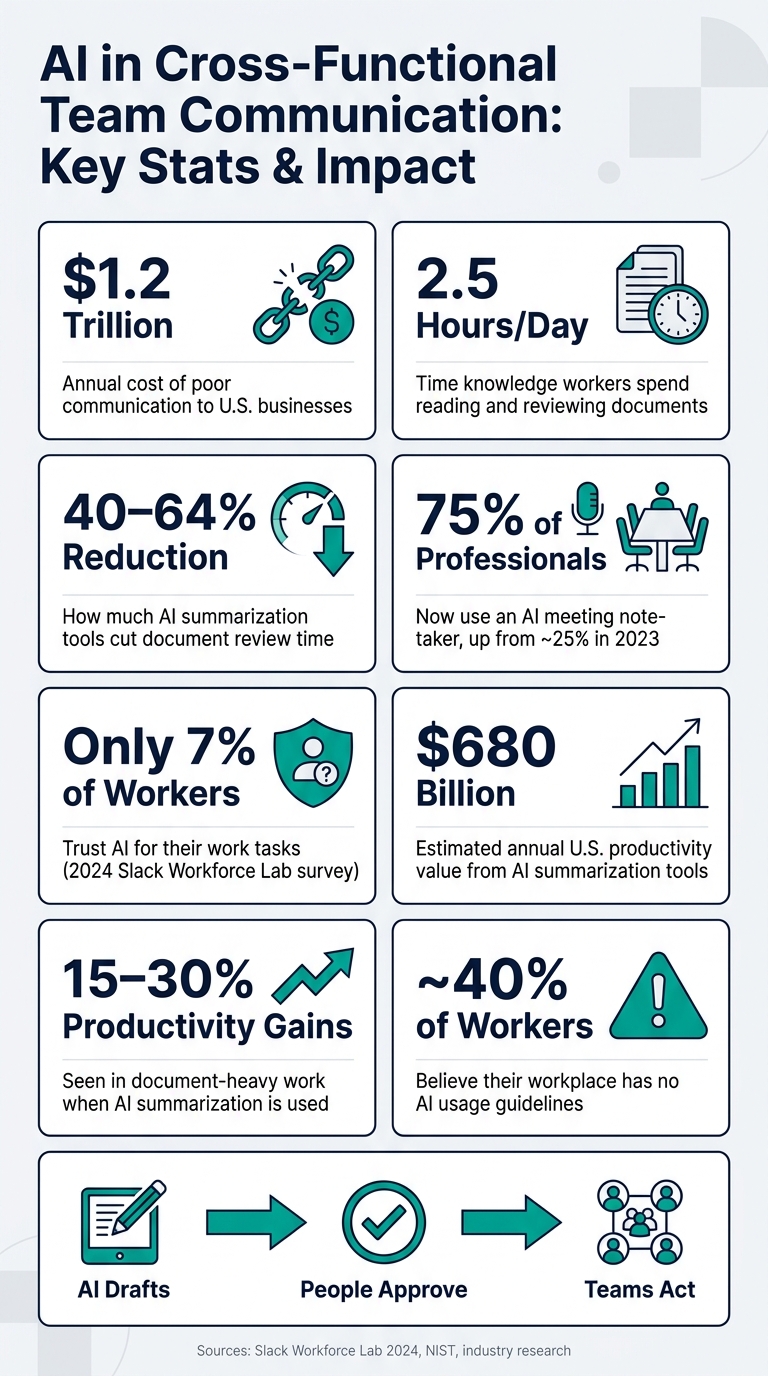
AI in Cross-Functional Team Communication: Key Stats & Impact
Are Virtual Tools And AI Essential For Future Cross-functional Teams? - Modern Manager Toolbox
sbb-itb-9ceb23a
How AI Addresses Core Communication Problems
AI helps most when it keeps the meaning intact as information moves from one team to another. In practice, three jobs matter most: translate, record, and distribute.
Building Shared Meaning Across Functions
AI can take one update and turn it into plain-English versions for different audiences, while keeping the facts the same and shifting the focus to fit each group’s goals and language.
For example, a product manager can take a technical refactor update and turn it into versions for executives, sales, and support. The core facts stay the same. What changes is the angle, so each group sees the business impact that matters to them.
What makes this work over time is standardized prompt templates by audience. If teams set those templates in advance and use them every time, people are far less likely to walk away with different interpretations of the same update.
That same pattern shows up in meetings too, especially when decisions need to survive the next handoff.
Keeping a Clear Decision Trail Between Meetings
Once the "why" gets lost, teams often end up debating the same choice all over again. AI meeting capture helps stop that by keeping a record of decisions across handoffs.
After a recorded meeting, a simple prompt - "Extract all decisions, rationales, and action items with owners and due dates. Summarize why each decision was made" - can turn the conversation into a structured recap. A project manager can then review it, fix anything that’s off, share it in Slack, and sync action items into Jira, Asana, or Notion. After that review, the recap - not the raw transcript - becomes the shared record.
The main things to capture are:
- Decisions
- Open questions
- Action items, with owners and due dates
- A short "why we chose this" note for each decision
About 75% of professionals now use an AI note-taker in meetings, up from about 25% in 2023.[1] That jump shows how fast AI meeting capture is becoming a normal part of cross-functional work.
AI-Assisted Summaries for Busy Stakeholders
AI also helps when leaders need the short version without losing the thread. It can shrink long email chains, project updates, and meeting notes into short briefs that surface decisions, risks, and required actions.
Right now, knowledge workers spend about 2.5 hours per day reading and reviewing documents. AI summarization tools cut that time by 40–64%, and document-heavy work sees 15–30% productivity gains when teams use them. Across the U.S., that adds up to an estimated $680 billion in annual productivity value.[2]
Here’s the plain truth: AI is good at fast first-pass summaries and high volume. Humans are better at nuance, judgment, and final approval.
A smart way to roll this out is to start with low-stakes internal updates, then set clear rules for where human review is required.
How AI Improves Translation, Handoffs, and Team Reach
Tailoring Messages Across Roles and Levels
The same facts don’t hit the same way for every person. An executive usually wants business impact and risk. A project owner is looking for scope and dependencies. A frontline contributor needs clear steps and deadlines. Send the exact same version to all three, and that’s often where communication starts to slip.
AI helps by turning one brief into different versions for each role without changing the facts. The facts stay put. What changes is the framing.
That same idea works well for global teams too. It’s not just about switching words from one language to another. Team chat tools can make an English message appear instantly in German for a German engineer, right inside chat.[6][7] Some translation tools also go past literal translation and adjust tone and context. For example, they can soften language that sounds too direct when writing to Japanese colleagues, which better fits hierarchy norms.[6][8][7] For U.S. teams spread across time zones, that can cut delays because no one has to wait for a bilingual teammate to rewrite notes.
Role-based translation closes one gap in communication. Handoff summaries deal with the next one: keeping work moving when people switch.
Cleaner Handoffs and Workflow Continuity
After AI shapes the message, the next job is holding on to context as work moves from one person or team to another. That’s where many handoffs fall apart. Tradeoffs get left out. Constraints disappear. Ownership gets fuzzy. Then the next team has to piece everything back together from old threads, meeting notes, and half-remembered comments - or they guess.
AI-structured handoffs help fix that. They can turn meeting transcripts and project updates into a standard package that includes:
- background and objectives
- current context for the next owner
- current status
- open questions
- dependencies
- action items by owner
- deadlines [3][4][5]
Meeting assistants can build these summaries and send them into work-tracking tools, so the next team gets a full picture instead of a mess of scattered messages.
For distributed U.S. teams working across time zones, this matters even more. When a West Coast team signs off and an East Coast team picks things up, AI-generated handoff packets let the work keep moving without a live recap call. The baton moves through documentation, not memory.
Governance and Trust: Where AI Communication Can Go Wrong
AI can speed up communication. It can also spread bad information just as fast.
That’s the trade-off. The same tools that move context across teams in minutes can also move errors, missing details, and wrong conclusions in minutes.
Accuracy, Bias, and Overreliance
Speed sounds great until people start treating AI output like finished work instead of a first draft.
That’s where things go sideways. A meeting recap can turn a conditional discussion into a decision that was never made. Then engineering starts acting on it. Compliance does too. Now one shaky summary has pushed two teams off course.
Research on large language model summarization found that many models systematically overgeneralize scientific conclusions, especially when explicitly prompted for accuracy.[9] NIST defines AI hallucinations as "confidently stated but false content,"[15][13] and even low hallucination rates become risky when teams treat a summary as the source of truth. So AI-generated summaries need an owner, not just a draft.
Bias is harder to spot, which makes it more dangerous in day-to-day communication. Summarization tools can give more weight to people who sound more assertive or write more fluent English. That means input from non-native speakers, junior team members, or underrepresented employees can get squeezed out of the official record.
Over time, that chips away at trust. It can also hurt decision-making when risk concerns never make it into the summary.
A few warning signs tend to show up early:
- People say they didn’t read the full thread because the summary looked fine
- The same miscommunication keeps happening, but no one can point to a human-approved source of truth
A June 2024 Slack Workforce Lab survey found that only 7% of workers considered AI trustworthy for their tasks, and about 40% believed their workplace had no AI usage guidelines at all.[12][14] That gap between adoption and governance is where communication problems usually start.
Setting Rules for Human-Owned vs. AI-Assisted Communication
A simple rule works well: use AI for drafting, but require human approval for any message tied to revenue, compliance, or outside commitments.
Put plainly, if a message could affect revenue, compliance, or a key account, a person must review and approve it before it goes out. AI can help shape the draft. It should not be the final voice.
Seth Mattison's concept of the Human Moat fits well here. As AI takes on more information-transfer work, the human parts of communication matter more. AI can line up context, but people still need to handle hard feedback, tradeoffs, and final delivery.
The cleanest way to protect trust is to separate what AI drafts from what humans approve. That way, accountability stays visible across teams.
| Task | Primary Owner | AI Role | Review Required | Risk Level |
|---|---|---|---|---|
| Customer incident or outage email | Customer Success Director | First-draft outline only | Human review required | High |
| Regulatory or compliance notification | Legal Counsel | Research and structure support | Human review required | High |
| Executive-level announcement | Senior Leader | Talking points draft | Human review required | High |
| External pricing or timeline commitment | Account Executive + Finance | Draft language | Human review required | High |
| Cross-functional project status update | Project Manager | Auto-summarization | Human spot-check | Medium |
Transparency matters too. A simple label like "AI-assisted summary, reviewed by [Name]" makes accountability clear and tells the reader that a human checked the content.[10][11]
That small step can help keep trust intact across functions, especially when teams deal with customer issues, legal matters, or compliance-related communication.
Conclusion: AI Support and Human Judgment Both Matter
AI can make cross-functional communication a lot easier. It keeps context in place, speeds up summaries, and makes handoffs less messy. And the research points in the same direction: AI paired with human judgment leads to better and faster decisions than either one on its own.[16][17][18] AI can help sort the signal from the noise. Leaders still make the call.
That changes what leadership looks like. Seth Mattison frames it as higher-value leadership work: as AI compresses knowledge work, leaders need to put more weight on judgment, trust, and alignment. AI can process information at scale, but people still own the hard part. Judgment, trust, and alignment are still human jobs.
The aim isn’t perfect agreement or endless detail. It’s just enough shared understanding so smart people can decide well and move together. After each AI-assisted exchange, ask a simple question: Did this help the team decide faster or better? If the answer is no, the tool isn’t helping. It’s just adding noise.
FAQs
How should teams review AI-generated summaries?
Treat AI-written summaries as a first draft, not the final word. A simple rule helps here: AI Plus One. If a summary or recommendation could affect a key decision, a person should review it before anyone acts on it. That extra set of eyes helps catch errors, add context, and make sure someone owns the outcome.
You also need clear rules for documentation. Mark documents as AI-assisted and name the final reviewer. That way, people know where the draft came from and who signed off on it.
AI is a good fit for routine documentation - the kind of work that follows a pattern and doesn't carry much risk. But when the stakes are high or the topic is sensitive, human oversight should stay in place. That's how you protect work quality and build a strong Human Moat.
Which team communications need human approval?
Human approval matters most when the stakes are high and someone has to stand behind the call.
That applies to high-stakes, customer-facing, and sensitive work, along with ethical dilemmas, major business decisions, performance reviews, team friction, and career growth. In those cases, AI output should be treated as a starting point, not the final answer.
How can leaders build trust in AI-assisted communication?
Leaders build trust in AI-assisted communication by putting transparency, accountability, and human review first. That starts with clear rules about when AI fits the job and when a person needs to step in.
Teams should be open about AI use, not hide it. And when mistakes happen, treat them as chances to learn, adjust, and improve. The goal isn’t to swap people out. It’s to use AI as a thinking partner while keeping human judgment at the center of accuracy and accountability.
Related Blog Posts

Seth Mattison
Top 50 Keynote Speakers in the World | Future of Work Strategist | Co-Founder & CEO